Dev Blog
Figma auto layout makes building react components easier
Since Figma released ‘Auto Layout’ in late 2019, I’ve found myself using it more and more to the point that now, I rarely use groups, or even regular frames. There are a bunch of reasons I think designers should adopt it into their workflow, from efficiency to streamlining working with content writers and more.
However, if you’re the type to create side projects, designing and developing them yourself, I think there is another, somewhat less tangible benfit to using auto layout in your designs.
I think using auto layout during the design process, makes building React components quicker.
But how though?
How could a feature in a design tool have any impact on writing React components?
It’s worth pointing out that I don’t think auto layout has any tangible impact on how I write components, only the speed at which I can put them together.
What designing with auto layout forces me to do is think about the eventual structure of the JSX markup. In most ways (not all), auto layout containers can be considered a <div>. As such the structure of your commponent in Figma, is likely to match the code markup to a good degree.
While I don’t tend to refer to the Figma layers when actually building a component, I already have a good idea going into development which items need to be grouped together to achieve the layout. By using auto layout, is shifting the thinking about layout markup structure into the design phase.
Lets take a simple card as an example:

Looking at a comparison of the JSX markup to the layers in Figma, there is quite a similarity, bearing in mind that Figma displays layers in reverse order to how they would be marked up in code:
Figma layers
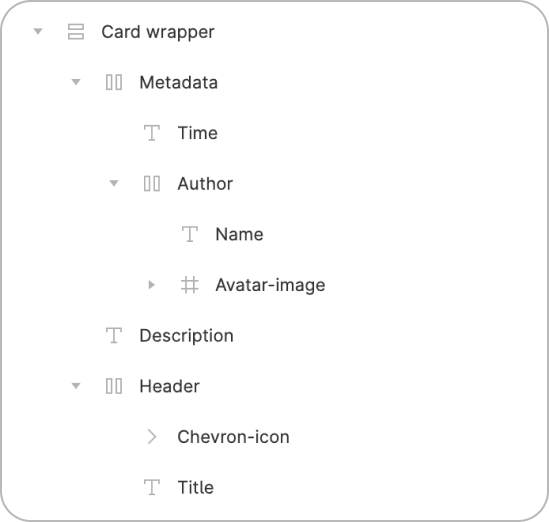
JSX Markup
<div className="card-wrapper">
	<div className="header">
		<h1>Card Heading</h1>
		<img src="chevron.svg" />
	</div>
	<p>Description</p>
	<div className="metadata">
		<div className="author">
			<img src="avatar-image.svg" />
			<p>Joanna Smith</p>
		</div>
		<time>3:10pm</time>
	</div>
</div>
Why should I care?
To be clear, I don’t see this as being the only benefit to using auto layout for developers that love building side projects. I just see this as another reason to adopt it and integrate it into the design workflow.
Even in the prototyping phase, I’ve found auto layout incredibly useful in creating a bunch of different versions of the same component, without the need to worry as much about padding and spacing. It’s also nice being able to use values to space and pad things rather than moving them around and having to check how far away they are from another element. You then know that if the element above grows by 20 pixels, everything below will shift.
When auto layout was released Figma published a blog post which outlines a lot of the core functionality and how this will make designing much simpler. Take a look and give auto layout a go! It might take a bit of getting used to initially but in my opinion its totally worth it.